The first sign that Tailwind v4 had changed the rules was a build error that looked like a typo: It looks like you're trying to use `tailwindcss` directly as a PostCSS plugin. The PostCSS plugin has moved to a separate package. If you just ran npm install tailwindcss@latest on a project that used postcss.config.js, that message is the new normal. The Oxide engine shipped with v4 did not just rewrite the compiler in Rust — it also pulled the PostCSS plugin out of the main package, renamed entry points, dropped support for @tailwind base, and turned tailwind.config.js into an optional compatibility shim. A tailwind v4 postcss build error is almost always a symptom of that reorganisation, not a real compiler bug.
This guide walks through the specific errors you will hit, what each one means, and the exact config changes that fix them. Examples target Tailwind 4.0 through 4.1, PostCSS 8.4+, and Vite 5/6 or Next.js 14/15.
Why the v4 package split broke every existing postcss.config.js
In Tailwind v3 you wrote this and moved on with your life:
// postcss.config.js (v3 — no longer works in v4)
module.exports = {
  plugins: {
    tailwindcss: {},
    autoprefixer: {},
  },
};
In v4 that exact file throws. The tailwindcss npm package no longer exports a PostCSS plugin function; it exports the engine. The PostCSS integration lives in a dedicated package called @tailwindcss/postcss. The fix is two lines:
npm uninstall tailwindcss
npm install tailwindcss@latest @tailwindcss/postcss@latest
// postcss.config.js (v4)
export default {
  plugins: {
    "@tailwindcss/postcss": {},
  },
};
Two things to notice. First, autoprefixer is gone. Oxide uses Lightning CSS under the hood and handles vendor prefixing and modern-syntax lowering itself, so keeping autoprefixer in the pipeline is redundant at best and will produce duplicated prefixes at worst. Second, the object key is the quoted string "@tailwindcss/postcss", not a bare identifier — PostCSS resolves plugin names as package names, so the scoped name has to be quoted.
The official installation page for the PostCSS integration shows exactly this two-package setup, with @tailwindcss/postcss listed as the only plugin needed and no mention of autoprefixer. If your screen matches the docs but the build still fails, the next section is almost certainly where the problem lives.
The @tailwind directives are gone — replaced by @import “tailwindcss”
After the PostCSS plugin swap, the second wave of tailwind v4 postcss build error reports comes from stylesheets that still use the old directives:
/* v3 entry stylesheet — throws or silently emits nothing in v4 */
@tailwind base;
@tailwind components;
@tailwind utilities;
Oxide removed those directives. The v4 entry point is a single CSS @import:
/* v4 entry stylesheet */
@import "tailwindcss";
That one line pulls in the preflight reset, the theme layer, and the utility layer in the correct cascade order. If you previously imported only @tailwind utilities because you were managing your own reset, v4 lets you import the layers individually:
@import "tailwindcss/theme" layer(theme);
@import "tailwindcss/utilities" layer(utilities);
The cascade layers are not optional cosmetics. Oxide emits everything wrapped in native @layer at-rules, which means the order of your @import statements now determines specificity in a way v3 papered over. If a custom stylesheet imported before @import "tailwindcss" suddenly has higher priority than it used to, that is why.
tailwind.config.js is optional — and that is why your theme stopped working
Tailwind v4 moved configuration into CSS. The @theme directive is now the canonical place to declare design tokens:
@import "tailwindcss";

@theme {
  --color-brand-500: oklch(0.68 0.19 250);
  --font-display: "Inter Variable", sans-serif;
  --breakpoint-3xl: 120rem;
}
Those custom properties are not just variables — Oxide reads them at build time to generate utilities. Declaring --color-brand-500 inside @theme gives you bg-brand-500, text-brand-500, border-brand-500, and every other colour utility for free. This is the part of v4 that tends to break silently rather than loudly: the build succeeds, no error is thrown, but classes like bg-brand-500 simply do not exist in the output CSS because Oxide never saw a matching token.
If you are migrating from a large tailwind.config.js with nested theme.extend.colors objects, you do not have to port everything at once. Add the compatibility import at the top of your entry stylesheet:
@import "tailwindcss";
@config "../../tailwind.config.js";
The @config directive tells Oxide to read the old JavaScript config as a fallback. It is slower than native @theme because it forces a JavaScript evaluation step during the build, but it keeps a large project compilable while you migrate tokens one file at a time.
Content detection is automatic — which is why your classes went missing
The v3 mental model was: declare content: ["./src/**/*.{html,js,ts,jsx,tsx}"] in the config, and Tailwind scans those globs for class names. In v4 that key is gone. Oxide walks the project’s dependency graph starting from your CSS entry and discovers template files automatically, using heuristics that include respecting .gitignore.
This is the single most common cause of “the build succeeds but half my classes are missing” reports on the Tailwind GitHub issue tracker. Two scenarios to check:
The first is templates outside the module graph. If your Rails views, Django templates, or PHP files live in a directory that is never imported by JavaScript, Oxide has no way to reach them through dependency crawling alone. The fix is the explicit @source directive:
@import "tailwindcss";
@source "../app/views/**/*.erb";
@source "../../emails/**/*.mjml";
The second is files the .gitignore excludes. Oxide treats gitignored paths as invisible by design, because scanning node_modules would destroy build time. If you keep generated templates in a gitignored dist/ directory and expect Tailwind to pick up classes from them, you need an explicit @source line or the classes will never land in the output.
Browser support regressions you will ship without noticing
Oxide emits modern CSS by design: native cascade layers, color-mix(), oklch() colours, @property for animated gradients, and logical properties. The v4 announcement lists the baseline as Safari 16.4, Chrome 111, and Firefox 128. If your analytics show a long tail of Safari 15 or Chrome 108 users, the output stylesheet will render broken for them — not with a build error, but with missing colours, collapsed layouts, and animations that never start.
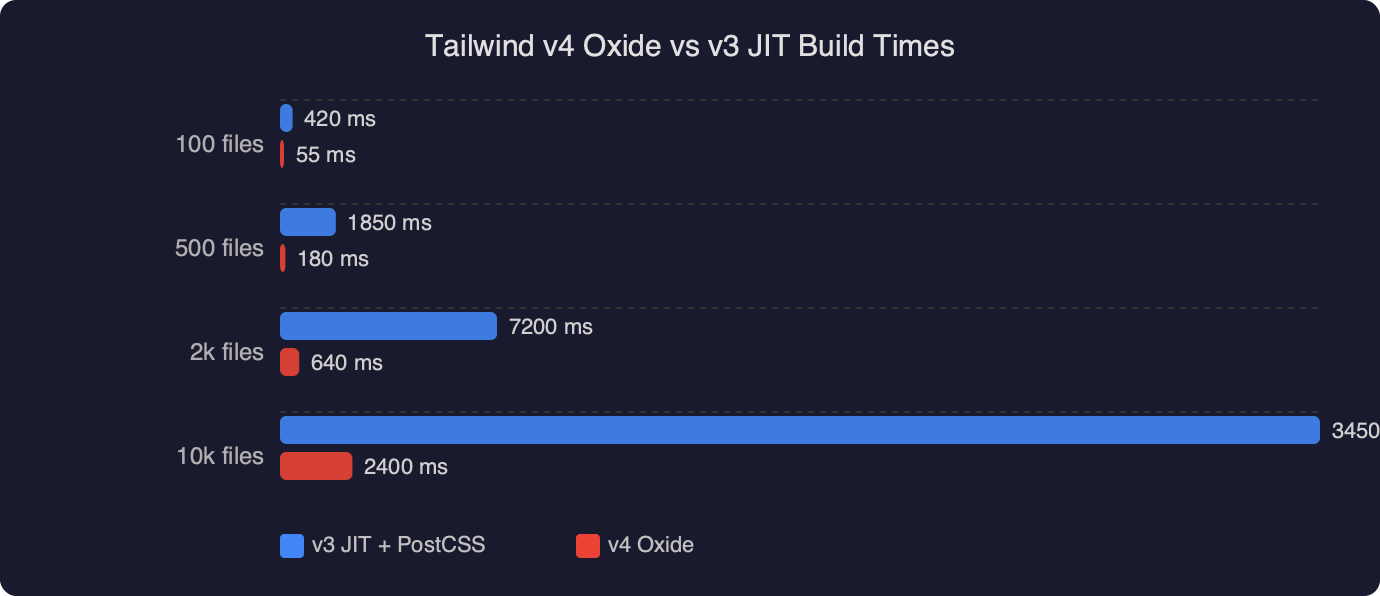
The benchmark comparison shows the scale of what the rewrite bought Tailwind in exchange for dropping those older engines. Full rebuilds on a mid-sized project drop from the multi-second range under the v3 JIT to sub-second under Oxide, and incremental rebuilds — the number that actually matters when you are iterating — collapse into single-digit milliseconds. The v4 launch post put the full-build improvement at roughly 3.5× and the incremental number at more than 100×, which is the kind of speedup you only get by abandoning PostCSS’s node-by-node AST walk for a single-pass Rust parser.
The “cannot find module” variant and how Vite fits in
A separate family of tailwind v4 postcss build error reports shows up in Vite projects as Cannot find module '@tailwindcss/postcss' or [vite] Internal server error: Failed to load PostCSS config. Two causes. Either the package is not installed (pnpm workspaces are a frequent culprit — the plugin lands in the wrong workspace), or the project is running Vite’s own Tailwind plugin and the PostCSS plugin at the same time, which double-processes the stylesheet and confuses both.
Pick one integration. For Vite projects, the first-party plugin is the recommended path:
// vite.config.ts
import { defineConfig } from "vite";
import tailwindcss from "@tailwindcss/vite";

export default defineConfig({
  plugins: [tailwindcss()],
});
If you use @tailwindcss/vite, delete postcss.config.js entirely or remove the @tailwindcss/postcss entry from it. Running both means Oxide processes the same stylesheet twice, which in the best case wastes build time and in the worst case produces duplicated @layer blocks that break cascade order.

Next.js 15 is a special case. The App Router’s built-in PostCSS support reads postcss.config.js, so the @tailwindcss/postcss plugin is the right choice there — the Vite plugin does not apply. Turbopack picked up compatible handling during the Next 15 minor releases; if you are on an older Turbopack build and see Error: PostCSS plugin tailwindcss requires PostCSS 8, upgrading Next.js is the fix rather than downgrading Tailwind.
A reproducible migration sequence
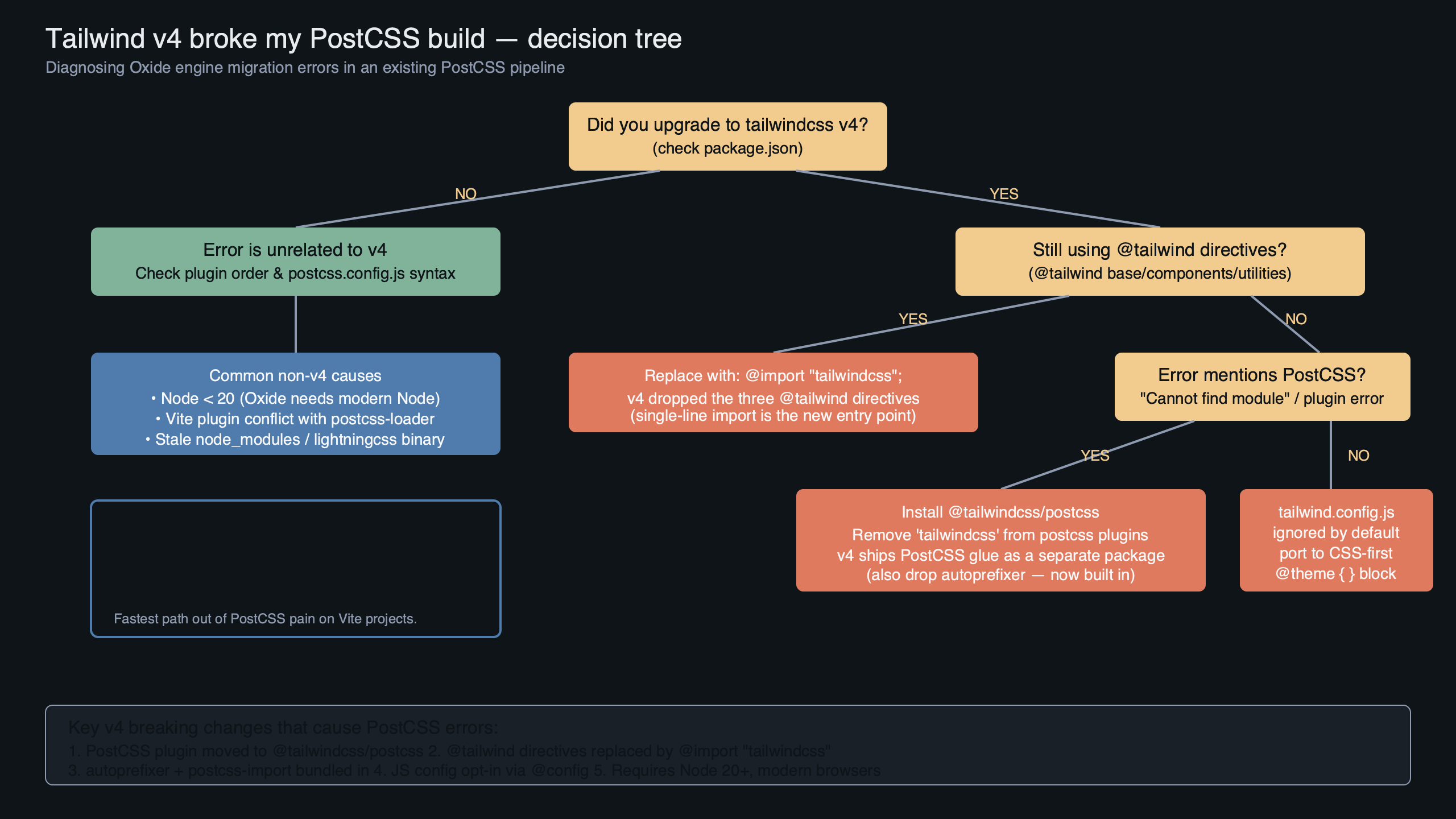
The diagram above maps the dependency flow of a working v4 project: the entry CSS file imports tailwindcss, which hands control to the Oxide engine; Oxide reads @theme tokens and @source globs, walks the template graph, and emits a single layered stylesheet that PostCSS (or the Vite plugin) then writes to disk. Nothing else touches the output. Autoprefixer, postcss-nested, postcss-import, and postcss-custom-properties were all absorbed into Oxide’s internal Lightning CSS stage, which is why removing them is part of the migration rather than an optimisation.
If you are starting a migration on a real codebase, the order that tends to fail the least is: install @tailwindcss/postcss alongside the v4 package, swap the PostCSS config, replace the @tailwind directives with @import "tailwindcss", add @config "./tailwind.config.js" so the existing theme keeps working, run the build, and fix any missing-class reports with explicit @source lines. Only after the build is green should you start porting theme.extend into native @theme blocks and delete the JavaScript config. Doing the token migration before the plugin migration turns one failure into two overlapping ones and makes bisecting impossible.
The single most useful habit during a v4 migration is to diff the emitted CSS before and after each step. Oxide’s output is deterministic, so a git diff on the built stylesheet will tell you immediately when a class disappeared because a @source glob was wrong, or when specificity shifted because @import order changed. Every tailwind v4 postcss build error I have seen traced in public issue threads comes back to one of the five causes above — the package split, the directive rename, the config format, content detection, or an autoprefixer clash. Fix them in that order and the Oxide engine stops being the thing that broke your build and starts being the reason your next one finishes before you blink.
FAQ
Why does Tailwind v4 throw ‘tailwindcss directly as a PostCSS plugin’ error?
Tailwind v4’s Oxide engine split the PostCSS plugin into a separate package. The main `tailwindcss` package now exports the engine, not a PostCSS plugin function. Fix it by running `npm install tailwindcss@latest @tailwindcss/postcss@latest`, then update postcss.config.js to use `”@tailwindcss/postcss”: {}` as the plugin key (quoted because it’s a scoped package name). Autoprefixer should also be removed since Lightning CSS handles vendor prefixing internally.
How do I replace @tailwind base directives in Tailwind v4?
Oxide removed the `@tailwind base`, `@tailwind components`, and `@tailwind utilities` directives entirely. Replace all three with a single line: `@import “tailwindcss”;`. That import pulls in the preflight reset, theme layer, and utility layer in correct cascade order. If you manage your own reset, you can import layers individually using `@import “tailwindcss/theme” layer(theme);` and `@import “tailwindcss/utilities” layer(utilities);`.
Why are my custom Tailwind colors missing after upgrading to v4?
Tailwind v4 moved configuration from tailwind.config.js into CSS via the `@theme` directive. Custom properties declared inside `@theme` (like `–color-brand-500`) are read by Oxide at build time to generate utilities. If your old JS config isn’t migrated, classes like `bg-brand-500` silently won’t exist in output CSS. As a temporary fix, add `@config “../../tailwind.config.js”;` to load the legacy config.
Why are some Tailwind classes missing from my Rails or Django templates in v4?
Tailwind v4 dropped the `content` config key. Oxide now walks the project’s dependency graph from your CSS entry point and respects `.gitignore`. Templates outside the JavaScript module graph—like Rails ERB views, Django templates, or PHP files—are invisible to it. Add explicit `@source` directives in your CSS, such as `@source “../app/views/**/*.erb”;`, to tell Oxide where to scan for class names.
References
- Tailwind CSS v4.0 announcement (tailwindcss.com) — source for the Oxide rewrite, build-time improvements, and the rationale behind dropping the PostCSS-centric v3 pipeline.
- Tailwind v4 upgrade guide — the canonical migration reference for the
@tailwinddirective removal, the@tailwindcss/postcsspackage split, and the@configcompatibility directive cited throughout this article. - Tailwind v4 PostCSS installation docs — shows the exact
postcss.config.jsshape used in the fix, including the removal of autoprefixer. - @theme and @source directive reference — primary source for the CSS-first configuration model and the automatic content detection behaviour described in the content-detection section.
- tailwindlabs/tailwindcss GitHub releases — version-by-version changelog for the 4.0 and 4.1 lines, useful for verifying which specific build errors were fixed in which patch release.
- Lightning CSS documentation — the Rust CSS toolchain Oxide embeds for prefixing and modern-syntax lowering, explaining why autoprefixer is redundant in a v4 pipeline.