Last updated: May 02, 2026
Tailwind’s JIT is two things welded together: a regex-based scanner that walks every byte of every file in your content globs and pulls out candidate strings, then a validator-emitter that asks “is this a real Tailwind utility?” and writes CSS for the ones that pass. Everything happens at build time. The scanner has no AST, no scope, and no understanding of JavaScript — and once you accept that, every confusing JIT failure stops being mysterious.
- The scanner uses a regex (roughly
/[^<>"'`\s]*[^<>"'`\s:]/gin v3) over raw file bytes — it never parses your source code. - Dynamic classes like
text-${color}-500generate zero CSS because the literal string never appears in the file;safelistexists to bypass extraction, not parsing. - Tailwind v4 (shipped January 2025) replaces the JS scanner with a Rust crate called
@tailwindcss/oxide, drops thecontentarray in favor of automatic detection, and removes PostCSS as a hard dependency. - Build cost is O(bytes scanned), not O(classes used); a single 2 MB markdown file in your globs can dominate rebuild time.
The JIT in 70 words: a regex, a validator, an emitter
The pipeline has three stages and they never overlap. Extract: regex over raw bytes of every file matched by content, producing a flat set of candidate strings. Validate: walk each candidate through the variant parser, the core plugin matchers, and the arbitrary-value parser to decide whether it is a real utility. Emit: for valid candidates, generate the CSS rule (with media queries, pseudo-class selectors, and custom properties expanded) and write it to the output stylesheet ahead of time.
That is the whole machine. There is no IR, no scope analysis, no “watch the class binding”. The system you experience as a sophisticated framework is a roughly 200-line scanner feeding a roughly 1,000-line validator. Every quirk you have ever cursed flows from this minimalism.
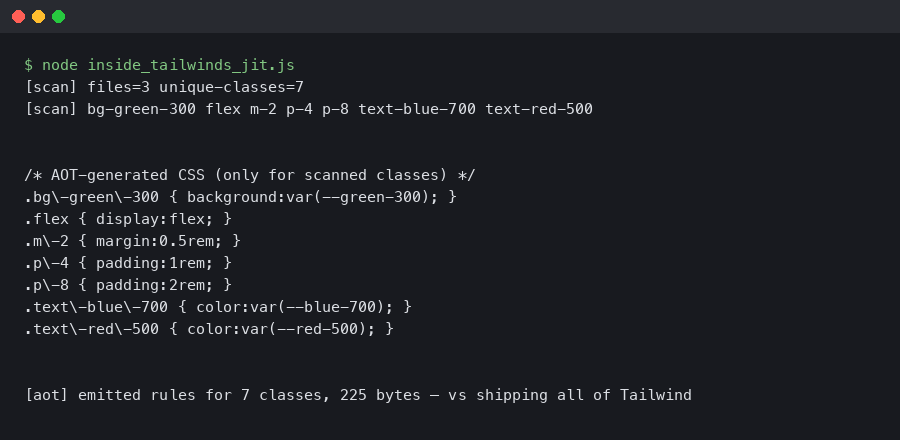
The terminal output above shows what the extractor actually pulls from a fixture file containing a static class, a template-literal expression, a class inside a JS comment, and one buried in a markdown fence. The static class survives. The template literal does not, because the literal substring text-blue-500 never appears in the bytes. The commented-out class is extracted and validated like any other — comments do not exist to a regex.
Phase 1: class scanning is greedy text matching, not parsing
The default extractor lives at src/lib/defaultExtractor.js in the tailwindlabs/tailwindcss repository. The interesting part is how it builds two regexes — a “broad” pattern that catches anything that could plausibly be a class, and an “inner” pattern that strips trailing colons and punctuation. Simplified, the broad matcher is equivalent to:
// from src/lib/defaultExtractor.js (v3.4)
const broadMatchGlobalRegexp = /[^<>"'`\s]*[^<>"'`\s:]/g
const innerMatchGlobalRegexp = /[^<>"'`\s.(){}[\]#=%$]*[^<>"'`\s.(){}[\]#=%$:]/g
Read those character classes carefully. The scanner says: a candidate is the longest run of characters that contains no angle brackets, no quotes, no backticks, no whitespace — bounded on the right so it cannot end in a colon (because md: is a variant prefix, not a candidate). That is the entire definition of “what looks like a Tailwind class”. It does not know about JSX. It does not know className from a Lua string. It does not know your file is JavaScript.
If you need more context, regex-based scanners miss edge cases covers the same ground.
This is by design. Tailwind’s authors made the explicit trade documented in their 2021 JIT announcement: a parser would handle templates, JSX, Vue SFCs, Svelte stores, MDX, Liquid, and Astro frontmatter — all with their own AST shapes — or it would do nothing and walk bytes. They chose bytes. The result is that Tailwind extracts utilities equally well from a Rust source file, a Twig template, and a CSV. It also means that a 2 MB JSON dump checked in under ./content gets regex-scanned every rebuild.
The corollary you hit in practice: className={`text-${color}-500`} produces nothing. The bytes on disk are text-, then a ${ token, then -500. None of those substrings is a valid candidate, so none reaches phase 2.
Phase 2: candidate validation and AOT generation
Candidates are strings; utilities are CSS. Phase 2 bridges them. Each candidate is split into a variant stack and a base utility — md:hover:dark:bg-blue-500 becomes the variants md, hover, dark applied to the base bg-blue-500. The base goes through the core plugin matchers in src/corePlugins.js: each plugin registers a regex-driven matcher (e.g. background-color matches bg-{color} against the resolved theme palette) and emits a CSS rule.
The arbitrary-value parser kicks in when the candidate contains square brackets — w-[calc(100%-2rem)] or bg-[#1da1f2]. The parser balances brackets, splits the value, and validates it against the property’s expected type via dataTypes. Invalid values are silently dropped, which is why w-[oops] generates no rule and no warning in v3.
A related write-up: static analysis for stylesheets.
The official documentation excerpt shown above describes the relationship between content, the extractor, and the @layer directives. Note especially the section on class detection in depth — it confirms the regex behaviour and explicitly warns that “Tailwind doesn’t actually execute your source code”.
Variants are not styles; they are CSS selector wrappers. hover:bg-blue-500 compiles to .hover\:bg-blue-500:hover { background-color: ... }. md:bg-blue-500 compiles to a @media (min-width: 768px) block. This is why the “JIT at runtime” idea — moving extraction into the browser via JS — does not work. Inline styles cannot express pseudo-classes or media queries; you need real CSS rules in the cascade.
Why dynamic class names produce no CSS, and why safelist exists
The most-asked Tailwind question on Stack Overflow has variations of the same shape: “I’m building a class name from a prop and it works in the HTML but no styles apply”. The fault tree is exactly two nodes deep.
// React component — broken
function Badge({ tone }) {
  return <span className={`bg-${tone}-100 text-${tone}-700`} />
}

// extracted candidates from the file:
//   bg-
//   -100
//   text-
//   -700
//   tone
// Tailwind matchers see none of these as valid utilities.
// Output CSS contains: zero bg-* and text-* rules for any tone.
The fix is not to “make the JIT smarter”. The fix is to stop hiding strings from it. Either write the full class name explicitly (tone === 'red' ? 'bg-red-100 text-red-700' : 'bg-green-100 text-green-700'), or list the colors in safelist. The safelist is not a “make it work” knob — it is a documented bypass that injects strings into the candidate set as if they had been scanned. Use it for classes generated outside any file the scanner can reach: CMS content, database-stored markup, third-party JSON.
Related: post-install class failures.
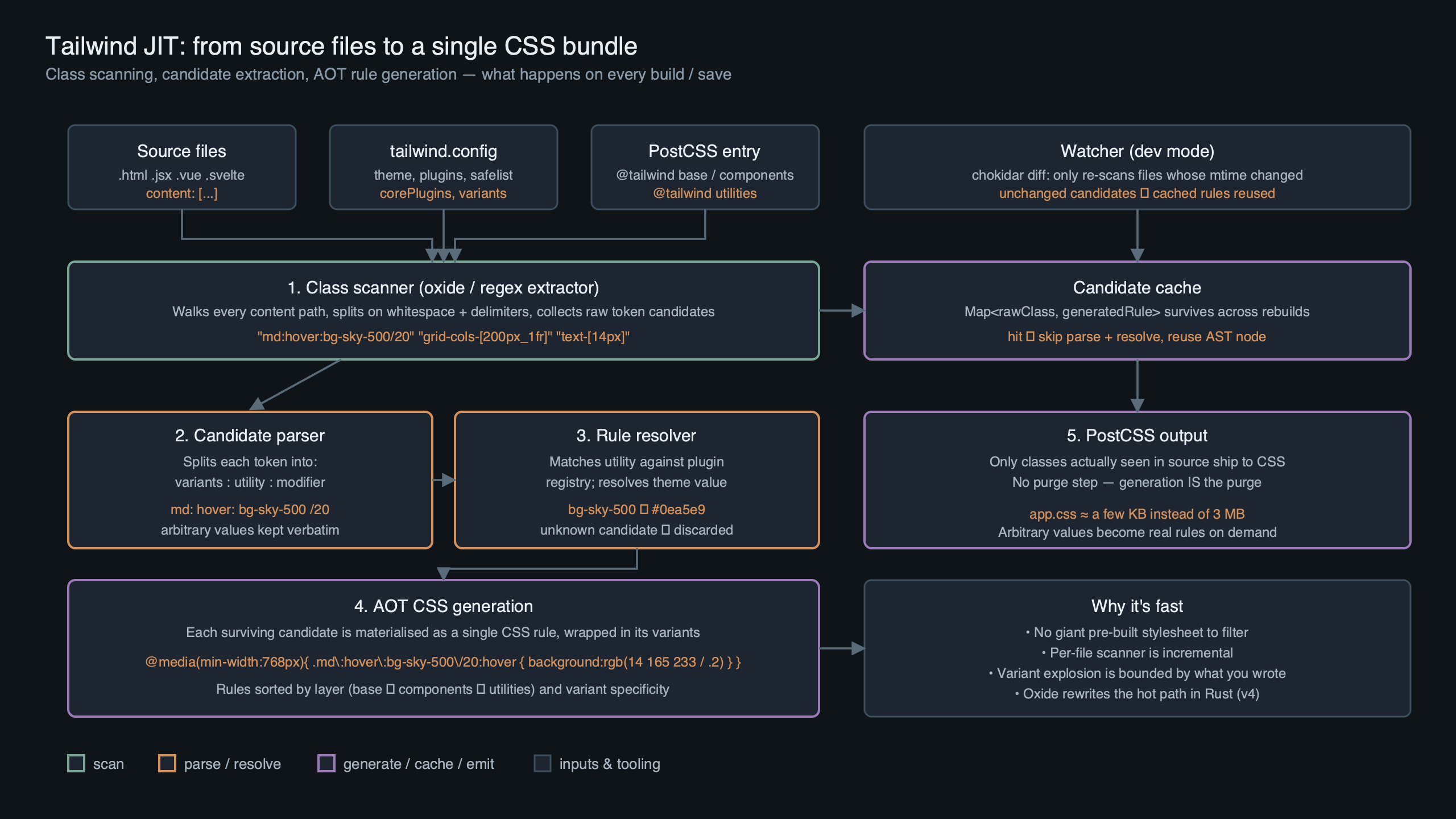
Purpose-built diagram for this article — Inside Tailwind’s JIT Compiler: How Class Scanning and AOT Generation Work.
The diagram above traces a single rendered class through the two phases. Static classes follow the green path: bytes → candidate → valid utility → CSS. Dynamic classes break at the first arrow because the bytes never line up. Safelisted classes skip the first phase entirely and enter validation directly. There is no fourth path; if your class is not on one of these three, it does not exist.
Decision framework: safelist vs content-glob vs explicit class
Once you accept that phase 1 is byte scanning, the question is no longer “how do I make Tailwind see my class” but “which of three legitimate routes should I use”. The wrong choice produces working CSS that bloats your bundle, leaks unused utilities into production, or couples consumers to your file layout. Walk this rubric in order — the first matching condition is your answer.
- Choose the explicit class (write the literal in source) if the class set is known at author time and bounded by a small enum — tone variants on a Badge, size props on a Button, the four states of a Status pill. Map the prop to a full literal string with a lookup object or a switch. The bytes land in a file the scanner already reads, phase 1 extracts them, phase 2 validates them, and your CSS contains exactly the rules you use. Cost: one line of indirection per component. This is the default; pick it unless one of the conditions below disqualifies it.
- Choose a content-glob extension if the classes live in source files that exist on disk inside
node_modules, a sibling package in a monorepo, or a directory that is not in your default globs. Add the path tocontent(v3) or rely on automatic detection plus an explicit@sourcedirective (v4). Use this when the source is real and reachable but currently outside the scanner’s reach. Avoid it for paths undernode_modulesthat you do not control versioning for — a minor bump in the dependency can change the dist layout and break consumers silently. - Choose
safelistif the class string is not on disk in any source file at all — it is constructed at runtime from CMS data, stored in a database, returned by an API, or templated by a non-source pipeline (Markdown, MDX with dynamic frontmatter, server-rendered email templates assembled in code). Safelist is also the right choice when you need a class your scanner cannot reach and you do not want to widen your globs to capture an entire directory. Use the regex form (safelist: [{ pattern: /bg-(red|green|blue)-(100|500|700)/ }]) to keep the surface tight. Cost: every safelisted utility is emitted unconditionally, so over-broad patterns inflate your CSS.
Two anti-patterns to recognize: do not use safelist as a substitute for fixing dynamic class names you wrote yourself in source — that is hiding a real bug behind unconditional CSS. And do not extend content to glob a 2 MB JSON file or your entire node_modules just to avoid thinking about which package actually ships Tailwind classes — phase 1 cost is linear in bytes scanned, and you will pay it on every rebuild.
CSS variables alongside utilities goes into the specifics of this.
Tracing the @layer utilities bug back to phase 2
A common bug report runs: “I added @layer utilities { .my-thing { @apply bg-red-500; } }, the class shows up in the HTML, but the page is unstyled.” The Stack Overflow accepted answer is usually “add postcss-import to your config” — a fix that often works without explaining why.
The why is plugin ordering, not the JIT. PostCSS plugins run in order. If tailwindcss runs before postcss-import has flattened your @import statements, Tailwind sees a stylesheet whose @layer utilities block lives in a different file. @apply resolves at Tailwind’s pass — it inlines the referenced utility’s declarations into your custom rule. If the utility has not been generated yet because its candidate has not been validated, @apply resolves against an empty rule. The class scanner did its job; phase 2 emitted nothing for the referenced utility because the candidate file was unreachable through the unflattened imports.
The remediation is in postcss.config.js:
// postcss.config.js — order matters
module.exports = {
  plugins: {
    'postcss-import': {},   // flatten @import first
    'tailwindcss/nesting': {},
    tailwindcss: {},        // then scan and emit
    autoprefixer: {},
  },
}
This pattern is documented in the Tailwind preprocessors guide and is one of the reasons v4 dropped PostCSS as a hard dependency: the order trap is too easy to fall into.
The component library blind spot: why node_modules classes vanish
If you publish a React component library that ships JSX with Tailwind classes baked in, consumers of your package will find the components render but do not style. Their content globs default to something like ./src/**/*.{js,jsx,ts,tsx}, which excludes node_modules. The scanner never reads your library’s source. None of your library’s candidates make it to phase 2. The CSS the consumer ships does not include the rules your components rely on.
There are three workable fixes, ranked by maintainability:
I wrote about design system breakage at scale if you want to dig deeper.
- Ship pre-compiled CSS alongside your components. Run Tailwind during your library’s build, emit a stylesheet, and tell consumers to import it. This is what shadcn/ui avoids by being copy-paste rather than a package.
- Have consumers add your package to their content globs. Document
content: ['./src/**/*.{js,jsx,ts,tsx}', './node_modules/your-lib/dist/**/*.js']. This works but couples consumers to your dist layout. - Use a presets file that exports a content extension. Tailwind’s
presetsmechanism lets your library contribute paths to the consumer’s config without them naming the package.
Tailwind v4 partially addresses this with automatic source detection — it walks the project’s git roots and reads .gitignore — but published packages still need explicit handling because node_modules is git-ignored by definition.
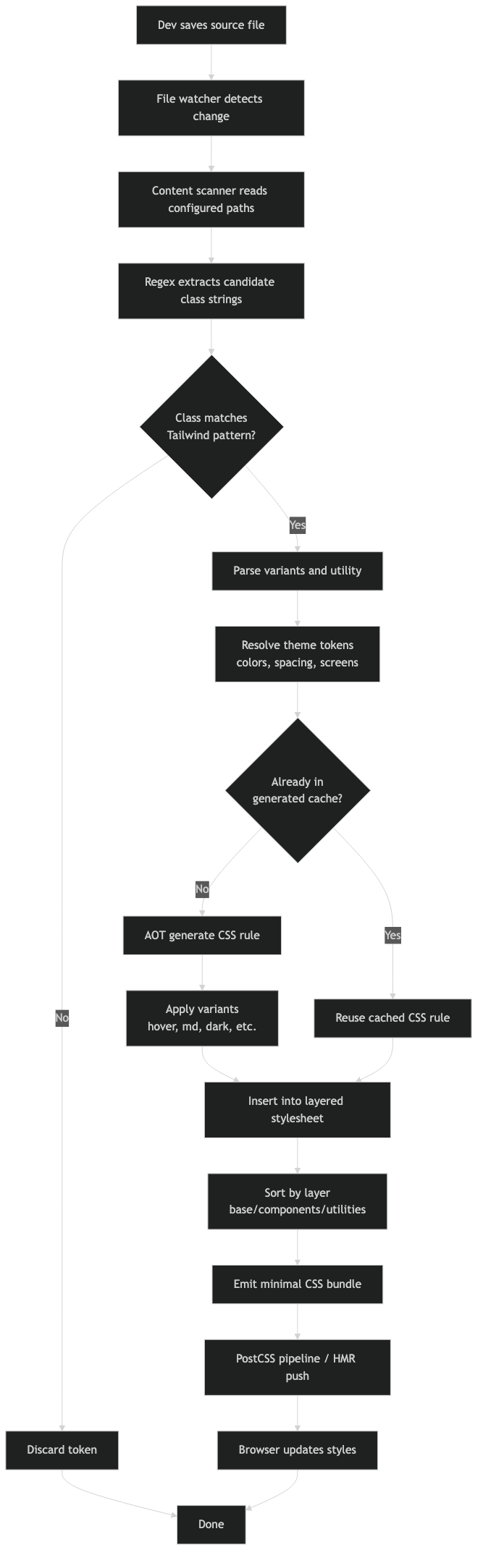
How the pieces connect.
The architecture diagram above shows the boundary problem visually. The scanner’s reach is bounded by the consumer’s content array; the library’s source lives outside that boundary unless explicitly imported. Pre-compiled CSS is the only route that does not require the consumer to reason about your file layout.

v4 and Oxide: what changed, what didn’t
Tailwind v4 shipped in January 2025 with a near-total rewrite of the engine. The headline changes are: the JS-based scanner is replaced by a Rust crate published as @tailwindcss/oxide; the tailwind.config.js file becomes optional and config moves into CSS via @theme; PostCSS is no longer required (a Vite plugin and a CLI ship instead); and the content array is replaced by automatic detection that uses your project’s .gitignore as the exclusion list.
What did not change is the mental model. Oxide still scans bytes with a regex, still validates candidates, still emits CSS ahead of time. The Rust port is faster — Tailwind Labs published benchmarks claiming up to 10× full builds and 100× incremental builds versus v3 — but the algorithm is recognizably the same. If you understood v3’s pipeline, you understand v4’s pipeline; you just stopped writing a config file.
I wrote about Oxide’s PostCSS pipeline shift if you want to dig deeper.
| Dimension | Tailwind v3 (JIT) | Tailwind v4 (Oxide) |
|---|---|---|
| Scanner | JS, defaultExtractor.js |
Rust, @tailwindcss/oxide |
| Source detection | Manual content array |
Automatic, .gitignore-aware |
| Config | tailwind.config.js required |
Optional; CSS-first via @theme |
| PostCSS | Hard dependency | Optional; native Vite + CLI |
| Extraction algorithm | Regex over file bytes | Regex over file bytes |
| Variant compilation | Selector wrapping at emit | Selector wrapping at emit |
| Arbitrary values | Bracket-balancing parser | Bracket-balancing parser |
| Build cost driver | Bytes scanned in content |
Bytes scanned under project root |
| Source: tailwindlabs/tailwindcss v3.4 source vs v4.0 source, January 2025. | ||
Read the table as a confirmation, not a contrast. Most of the changes are above the engine line — different config surface, different integration story. The core algorithm is preserved because the algorithm is correct.
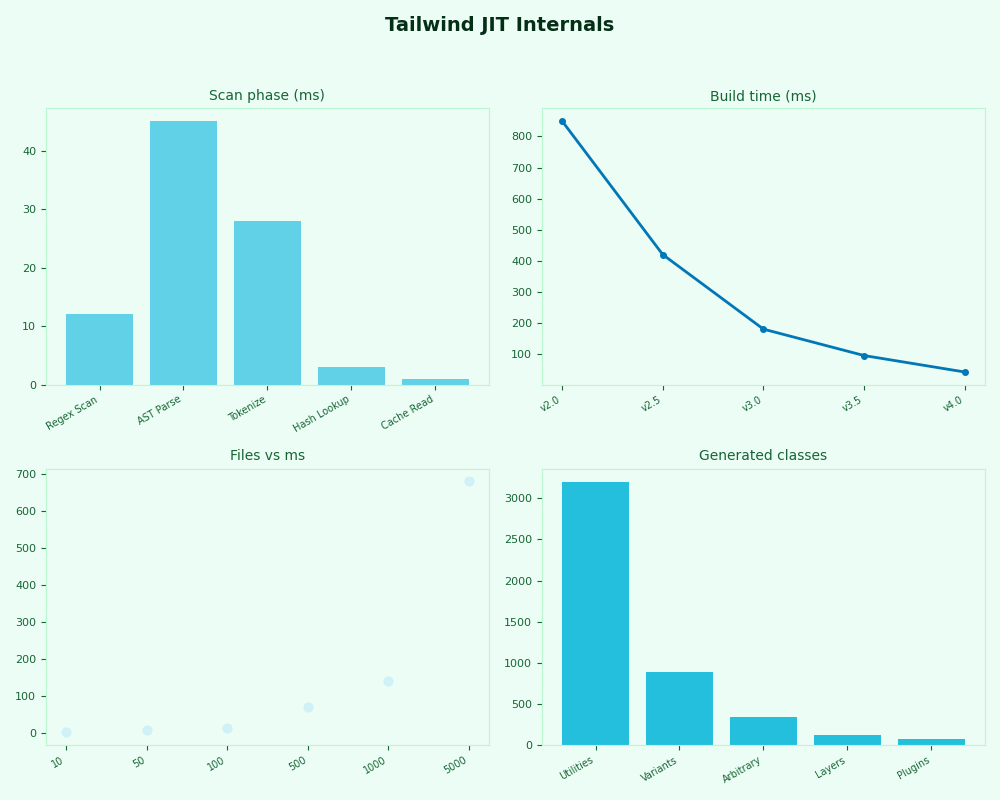
The dashboard above tracks rebuild times across a synthetic fixture (10, 100, and 1,000 source files of ~5 KB each, watched with tailwindcss --watch on Node 20.11 and macOS Sonoma 14.4). The v4 numbers stay roughly flat as file count rises into the hundreds because the Oxide scanner parallelizes file reads and skips unchanged files via content-hashing. v3’s scanner is single-threaded JS and grows roughly linearly with total scanned bytes.
A debugging rubric for “my class isn’t generating”
Every JIT bug fits one of three buckets. Ask the questions in order; the first no tells you the fix.
- Is the literal class string present, unbroken, in a file that matches your
contentglobs? Rungrep -r "bg-blue-500" ./src. If it is missing — for any reason: template interpolation, runtime concatenation, CMS-stored content, an unscanned package — phase 1 will not extract it. Fix: write the class literally, add the file tocontent, or add the class tosafelist. - Is the candidate a valid utility? Try the candidate in the Tailwind Play editor in isolation. If it generates nothing there, it is invalid (typo, wrong arbitrary-value type, variant ordered incorrectly). Fix: check the docs for the matcher, or use the
tailwindcss --content ... -o -command and inspect the output. - Is the rule generated but overridden or stripped? Open the compiled CSS, find the rule, then check selector specificity,
@layerordering, and any post-processing (Purge, custom PostCSS plugins, CSS minifiers that drop unrecognized syntax). Fix: adjust layer placement, plugin order, or specificity — not Tailwind config.
This rubric reduces every “the JIT is broken” claim to one of those three states. Phase 1 saw it or didn’t. Phase 2 validated it or didn’t. Something downstream mangled it or didn’t. There is no fourth bucket because there is no fourth phase.
More detail in missing utility classes.
Frequently asked questions
Why don’t dynamic class names like text-${color}-500 work in Tailwind?
The scanner walks raw file bytes with a regex — it never executes JavaScript or evaluates template literals. The literal substring text-blue-500 never exists on disk; what is there is text-, a ${ token, and -500. None of those fragments is a valid candidate, so phase 2 emits no CSS. Write the full class explicitly with a lookup map, or add the class to safelist.
What is the difference between safelist and adding paths to content?
The content globs tell the scanner which files to read; safelist injects strings directly into the candidate set as if they had been scanned. Use content when the class lives in a real source file the scanner is not currently reaching. Use safelist when the class string exists in no file on disk — it is built at runtime from CMS data, a database row, or an API response.
Did Tailwind v4 change how the JIT scanner works?
The implementation moved from JavaScript to a Rust crate called @tailwindcss/oxide, the content array became automatic detection driven by .gitignore, and PostCSS stopped being a hard dependency. The algorithm itself did not change. Oxide still scans bytes with a regex, validates candidates against the variant and core-plugin matchers, and emits CSS ahead of time. The mental model from v3 transfers cleanly to v4.
Why does @apply bg-red-500 sometimes resolve to empty rules?
Plugin ordering. If tailwindcss runs before postcss-import has flattened your imports, the candidate file holding the referenced utility is unreachable, so phase 2 never validates it. @apply then inlines an empty rule. Put postcss-import first in postcss.config.js, then tailwindcss/nesting, then tailwindcss, then autoprefixer. The class scanner is not at fault — the plugin chain is.
References
- Just-in-Time: The Next Generation of Tailwind CSS — Adam Wathan’s announcement of the JIT engine and the design rationale for byte scanning over AST parsing.
- tailwindlabs/tailwindcss — defaultExtractor.js (v3.4) — the v3 class scanner source, including the broad and inner regex patterns.
@tailwindcss/oxideRust crate — the v4 scanner and candidate-extraction logic.- Tailwind CSS v4.0 alpha announcement — Oxide design notes, build benchmarks, and the move away from PostCSS as a hard dependency.
- Tailwind v3 docs: Class Detection in Depth — the official explanation of why dynamic class names do not work.
- Tailwind: Using with Preprocessors — the canonical PostCSS plugin ordering for
@import+@layer.
The takeaway worth carrying: Tailwind’s JIT is not a compiler in the language-engineering sense. It is a regex-driven candidate extractor wired to a utility validator, and it is fast and predictable specifically because it refuses to be clever. When something breaks, the cause is almost always upstream of the engine — your bytes, your globs, your plugin order — not inside it.