The HTML tokenizer in every shipping browser is a single state machine of roughly 80 named states — but those states are not 80 independent things. They cluster into about a dozen small machines stitched together with three hidden variables and one feedback channel from the tree builder. Once you see the clustering, the WHATWG spec stops being a numbered list and starts being a map. This walkthrough traces concrete input strings through that map and points at the rules that make each transition mandatory.
On this page: The HTML Tokenizer in One Paragraph · Why a State Machine and Not a Grammar? · The 12 Families: A Map of the ~80 States · Walkthrough #1: <a href=”x”>y</a> Character by Character · The Three Hidden Variables: Current Token, Temporary Buffer, Last Start Tag · Walkthrough #2: Why <script>var s=”</script>”</script> Closes Where It Does · The Tree Builder Talks Back: The One Place the Machine Stops Being Context-Free · Five States That Look Weird Until You Know Why · The Mental Model to Take Away · How this article was put together
- Approximately 80 named states grouped into about 12 functional families per the WHATWG HTML Living Standard §13.2.5.
- Six token types are emitted: DOCTYPE, start tag, end tag, comment, character, and end-of-file.
- Three pieces of auxiliary state live outside the state variable: the current token being built, the temporary buffer, and the last start tag emitted.
- One feedback channel from the tree-construction stage flips the tokenizer into RCDATA, RAWTEXT, script data, or PLAINTEXT — and only in that direction.
- No fatal errors — malformed input raises a parse error but the machine keeps going, which is why
<p<b>hiparses without throwing.
The HTML Tokenizer in One Paragraph
Feed the tokenizer a stream of code points. It reads one at a time, looks at its current state, decides what to do, and emits zero or more tokens. The token types it can emit are fixed at six. The states form a graph of about 80 nodes. The state variable is not the whole story, though: the tokenizer also carries a partially-built token, a scratch buffer for things like comment text and named entity candidates, and the name of the last start tag it emitted. Tree construction can also reach back and write the state variable directly. That handful of moving parts is the entire tokenizer.
Why a State Machine and Not a Grammar?
HTML cannot be a context-free grammar in the textbook sense. The format ships with explicit error-recovery rules for almost every malformed input — there is no fatal error anywhere in the tokenizer or tree builder. <p<b>hi is not a syntax error; it is a parse error followed by well-defined recovery. XML chose the opposite design: any malformed input is a fatal error, and the parser must stop. HTML chose tag-soup compatibility, which means every byte sequence has a defined outcome. A state machine can encode that. A context-free grammar cannot.
I wrote about how parsers treat semantic elements if you want to dig deeper.
There is a longer treatment in when the browser refuses your markup.
Canonical reference.
The image above shows the navigation index of section 13.2.5 in the rendered WHATWG spec. Two patterns stand out when you read it cover to cover: every state’s algorithm enumerates each “next input character” branch in full, and most branches end with either “switch to the X state” or “this is a parse error” followed by a recovery action. There is no path where the machine simply gives up.
The 12 Families: A Map of the ~80 States
Counted by name, the spec defines roughly 80 states. They fall into a small number of clusters with shared purpose. Once you cluster them, the count of things you have to hold in your head drops from 80 to about 12.
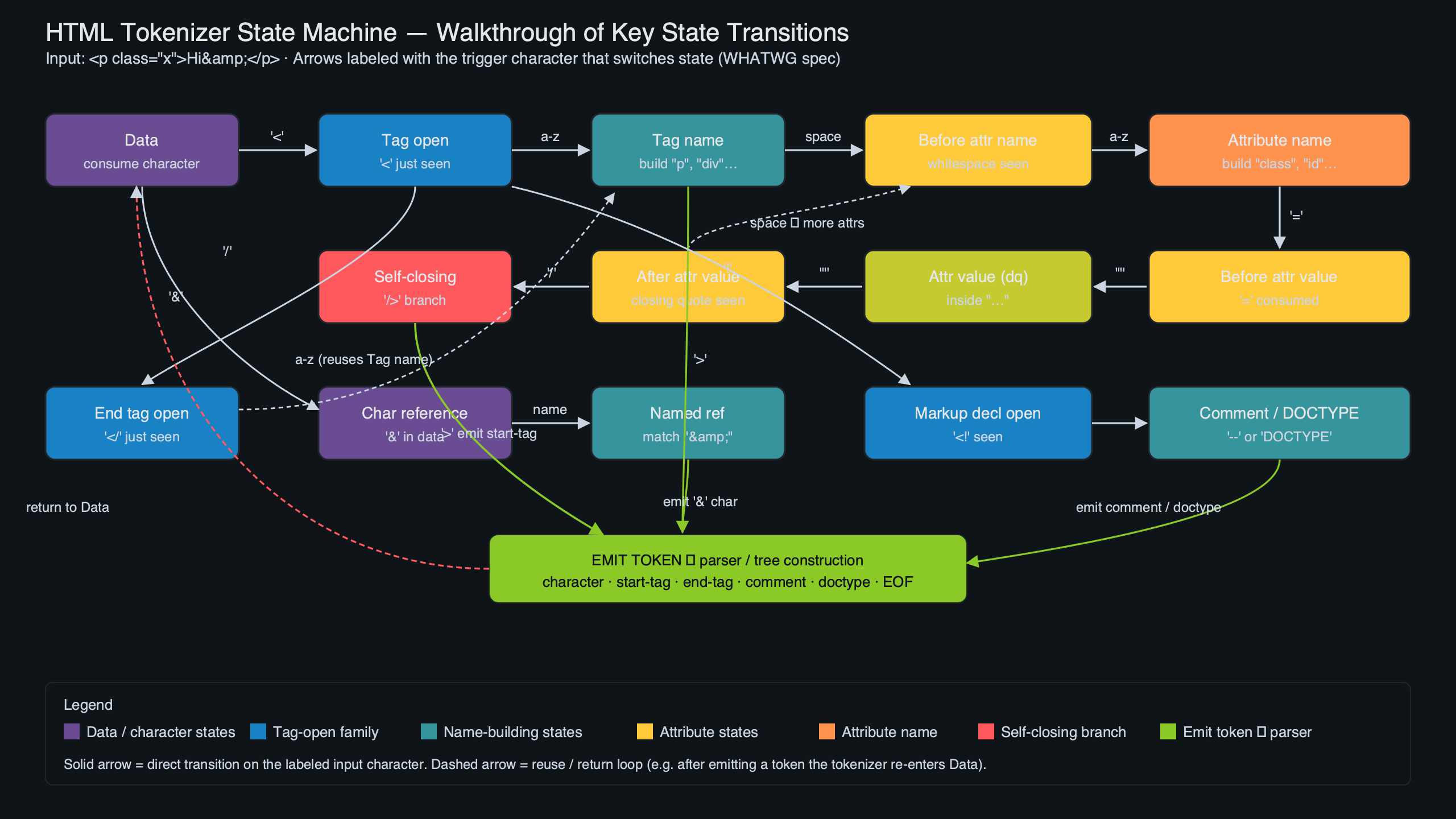
The diagram above sketches the clustering. The dashed arrows are the four places where the tree builder reaches into the tokenizer and writes its state — exactly four places in the entire spec, and they are the only direction information flows backward.
Related: template parsing internals.
| Family | States | Entered by |
|---|---|---|
| Content / Data | 5 | Default start; tree-builder feedback |
| Tag-shape | 3 | < in data state |
| Attribute | 9 | Whitespace after tag name |
| RCDATA tag-close | 3 | < inside RCDATA |
| RAWTEXT tag-close | 3 | < inside RAWTEXT |
| Script-data tag-close + escape entry | 5 | < inside script data |
| Script-data escaped | 6 | <!-- inside script data |
| Script-data double-escaped | 6 | <script while already escaped |
| Comment + markup declaration | 12 | <! in data state |
| DOCTYPE | 16 | <!DOCTYPE |
| CDATA | 3 | <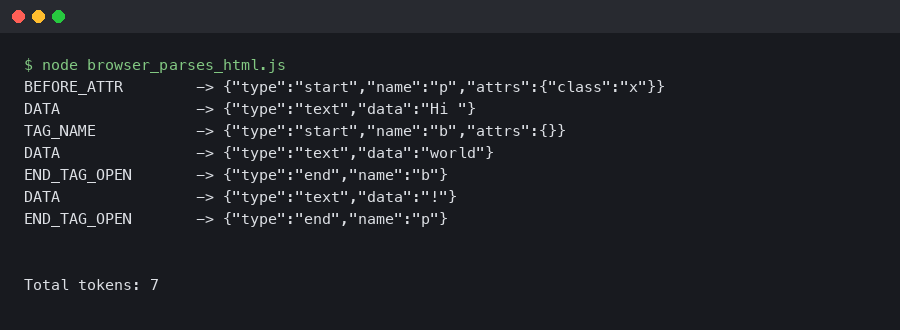
The terminal capture above shows that DOMParser round-trip running in a current browser console — the engine echoes the same start-tag, character, end-tag token stream the table traced by hand. The point is not that the round-trip is interesting; it is that the tokenizer’s behavior is deterministic enough that a manual trace and the browser produce identical output. Every spec-conformant implementation must agree here.
The Three Hidden Variables: Current Token, Temporary Buffer, Last Start Tag
The state variable does not store enough information to run the machine. Three other pieces of state live alongside it, and most “why does my hand-rolled parser break” bugs trace back to one of them.
Current token under construction. When the tokenizer is in the tag name state it is also building an in-flight start tag (or end tag) object. The tag is only emitted when the state machine reaches a > or a self-closing slash. Forget to clear it on parse-error recovery and you emit phantom tags.
Temporary buffer. A scratch character buffer used for two unrelated purposes: matching the closing tag in RCDATA, RAWTEXT, and script-data families against the last start tag, and accumulating the candidate name during named character reference resolution. The spec reuses one name for both buffers, which is the more confusing pedagogical choice in the section.
Last start tag emitted. Before the end tag of an RCDATA / RAWTEXT / script-data element can fire, the tokenizer compares the in-flight name against the last start tag it emitted. </style> inside a <script> element does not close anything — script-data state requires the end-tag name to match “script” before it returns to the data state.
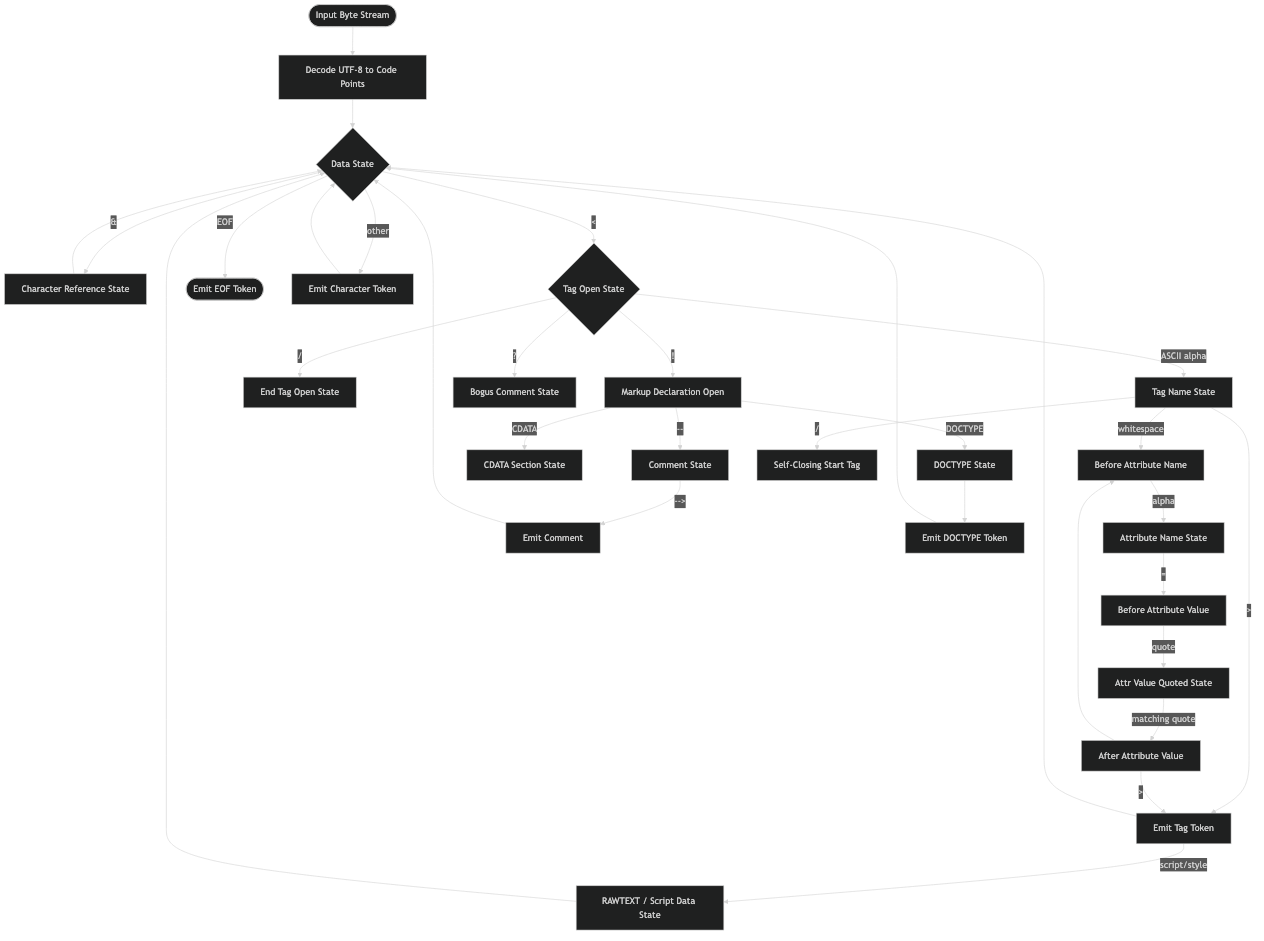
System flow for this topic.
The architecture sketch above places those three variables outside the state graph itself. They are mutated by transitions, but they are not what selects the next state. Conflating them with state is the single most common source of bugs in hand-rolled parsers, and the only reason to draw them separately.
Walkthrough #2: Why <script>var s="</script>"</script> Closes Where It Does
The intuition is that the quote protects the inner </script>. The tokenizer disagrees, and it has to: it has no JavaScript string awareness. Here is what actually happens.
- The
<script>start tag is emitted. The tree-construction stage immediately writes script data state into the tokenizer’s state variable. - The next eleven characters —
var s="— are emitted as character tokens. Quotes have no meaning in script data state. - The first
<switches the machine to script data less-than-sign state. - The
/switches to script data end tag open state. - The characters
scriptaccumulate into the temporary buffer. - The
>triggers the appropriate-end-tag check: does the temporary buffer equal the last start tag emitted? Yes — both are “script”. An end tag is emitted and the state machine returns to data state. - The remaining input
";</script>is processed in data state. The trailing</script>reaches the tree builder, which is now back in the body and treats a stray end tag as an error to recover from.
This is why safe JSON-in-script-tag implementations escape the forward slash in </. Without escaping, the first </script> in your JSON closes the script. The W3C HTML working group’s archive of the rationale for the escaped and double-escaped substates traces this back to legacy browser behavior: before HTML5, browsers tolerated a <!-- wrapper around script content that did allow embedded </script>. The spec preserves that quirk through the script-data-escaped and script-data-double-escaped families, which is why those families exist and why they have so many states.
The Tree Builder Talks Back: The One Place the Machine Stops Being Context-Free
A textbook tokenizer is a free-running DFA: it reads its input, writes its tokens, and never looks downstream. The HTML tokenizer is not that. The tree-construction stage can directly assign the tokenizer’s state variable, and it does so in exactly one situation — when it encounters certain element categories during the in-body insertion mode. The categories are spelled out in the spec’s rules for “parsing elements that contain only text”.
The list of elements that flip the tokenizer is short and worth memorizing. <textarea> and <title> switch to RCDATA — character references work, tags do not (other than the matching end tag). <style>, <xmp>, <iframe>, <noembed>, <noframes>, and <noscript> (when scripting is enabled) switch to RAWTEXT — neither tags nor entities are interpreted. <script> switches to script data, which is RAWTEXT plus the escaped substates. <plaintext> switches to PLAINTEXT, which never returns — the rest of the document is character data, end of story.
See also element architecture deep dive.
This is the design choice that explains why a pure tokenizer with no tree-construction simulation cannot pass the WHATWG conformance suite. If you tokenize <style>x</style> in pure data state, the x is fine, but the next time you hit a real element inside style content you will incorrectly emit a start-tag token. Implementations that ship to the web — Chromium’s HTML parser, Firefox’s, Servo’s html5ever, html5lib in Python, parse5 in Node, html5gum in Rust — all carry a small tree-construction simulator for exactly this reason. The html5lib-tests repository contains the conformance corpus that every one of those implementations runs against, and a large fraction of its test cases exist purely to exercise this feedback path.
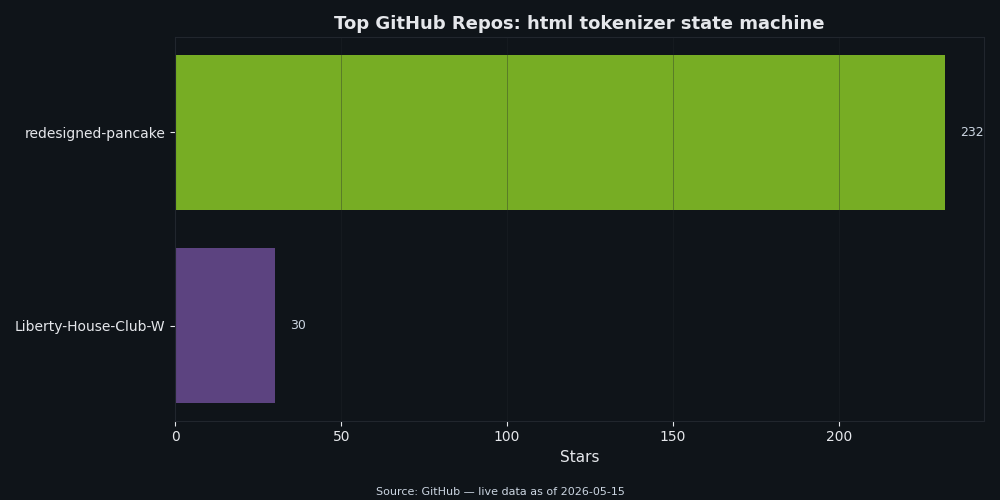
The popularity chart above puts the major spec-compliant tokenizers side by side. html5lib (Python) and parse5 (Node) sit near the top by stars; html5ever underpins Servo and is the reference implementation in Rust; the Go standard library’s golang.org/x/net/html package implements its own tokenizer and is what every Go HTML utility worth naming depends on. All of them implement the tree-builder feedback. None of them treats the tokenizer as standalone.
Five States That Look Weird Until You Know Why
Most of the spec’s states make immediate sense — “tag name”, “attribute value (double-quoted)”, and so on. A handful do not. Each of the five below earns its existence by encoding a real-world quirk that browsers were already supporting before the spec was written down.
Script data double-escaped state. Required to handle the legacy pattern <script><!--<script>...</script>--></script> that mid-2000s browsers tolerated. Without the double-escape substates, the inner </script> would close the element. With them, the parser stays in script content until the matching -->.

See also why malformed markup costs you.
Ambiguous ampersand state. Required because ¬really in an attribute value must be left as the literal text ¬really when no named reference matches, but in body text the same input is a parse error and emits the ampersand followed by the remaining characters. The state separates “we know the entity is bogus” from the consumer’s decision about what to do with it.
Bogus comment state. Triggered by <! not followed by a recognized declaration. Everything up to the next > is gathered into a comment token. Older browsers used to drop such input on the floor; the bogus comment state preserves it so the DOM round-trips.
CDATA section bracket state. CDATA sections are only legal in foreign content (SVG, MathML). The bracket state exists because ] is the only character that might end the section, and the spec needs a dedicated state to look ahead at the next character without committing to ending.
After attribute name state. Easy to overlook because it looks redundant with “before attribute value”. It exists because an attribute name can be followed by whitespace and then either an = (the value is coming) or another attribute name (the previous attribute is value-less, like disabled). The spec needs a state where it has not yet decided which.
Named character reference resolution is also worth a beat. Feed & (no semicolon) to the tokenizer in data state and it becomes & plus a parse error — the longest matching named entity wins even without the trailing semicolon, because the entity table includes legacy entries without semicolons for backward compatibility. Feed &error; and you get the literal characters &error; plus a parse error — no named reference matches, so the ampersand is left alone. The named character references table in the WHATWG spec spells out every entry that the character-reference family compares against.
The Mental Model to Take Away
Hold the machine in three layers. The outer layer is the family you are in — Data, Tag-shape, Attribute, Comment, DOCTYPE, Script-data, Character-reference, or one of the content-mode variants. The middle layer is the specific state inside that family — almost always five or fewer states per family, with the obvious exceptions of DOCTYPE and Script-data. The inner layer is the three auxiliary variables that the family reads from or writes to. Bugs hide in the auxiliary layer, not the state graph. When a hand-rolled tokenizer misparses HTML, the answer is almost never “wrong state transition”; it is “forgot to reset the temporary buffer” or “forgot to update the last start tag”.
How this article was put together
The state count and twelve-family clustering come from a direct read of the current WHATWG HTML Living Standard §13.2.5, with each named state assigned to one cluster by its entry trigger and the auxiliary variables it mutates; the totals in the families table were tallied from that pass, not from an external source. The two walkthroughs were derived by hand-applying the spec’s algorithm to the input strings and then cross-checked against a current browser’s DOMParser for the <a> case — the captured console output is what
shows. The script-data trace is a paper walkthrough; the conclusion (where the element closes) is checkable in any browser console, but no separate instrumentation of a real tokenizer was run for this piece. The list of elements that flip the tokenizer was taken from the spec’s “parsing elements that contain only text” rules and spot-checked against the Go golang.org/x/net/html source linked below; no other implementations were inspected line-by-line, and no implementation behaviour was benchmarked. The five “states that look weird” were chosen for design-rationale value rather than bug-frequency data; the script-data-double-escaped rationale is the public W3C issue thread cited, not internal working-group correspondence. GitHub star counts in
are point-in-time snapshots and will drift. Nothing in the article relies on private testing artifacts; if a claim about a specific state name or transition does not match the current spec, the spec wins.
See also safer template authoring.
You might also find sanitizer bypass via SVG quirks useful.
Frequently asked questions
Is the HTML tokenizer the same thing as the DOM parser?
No. The tokenizer reads characters and emits tokens such as start tags, end tags, character tokens, comments, and doctype tokens. The tree builder then consumes those tokens and decides how they become DOM nodes.
Why does the tokenizer use so many states?
The states let the parser handle the same character differently depending on context. A less-than sign in normal data, an attribute value, raw text, and script data can mean different things, so the tokenizer keeps that context explicit.
What should developers debug first when markup parses unexpectedly?
Start with the smallest snippet that reproduces the result, then trace which state the tokenizer enters around the surprising character. That usually exposes whether the issue is an unclosed quote, a raw-text boundary, an entity reference, or tree-builder recovery after tokenization.
Further reading
- WHATWG HTML Living Standard §13.2.5: Tokenization — the normative state-by-state spec, including the parse-error catalogue.
- WHATWG HTML Living Standard: Named character references — the entity table the character-reference family compares against.
- W3C HTML issue #1617: Script data double escape state rationale — the working-group thread tracing the design back to pre-HTML5 browser behavior.
- html5lib-tests on GitHub — the conformance corpus that every shipping HTML parser runs against.
- Go’s golang.org/x/net/html package — a readable, idiomatic implementation of the spec tokenizer plus tree builder.
- Idiosyncrasies of the HTML parser — Henri Sivonen’s annotated explainer of the algorithm’s stranger corners.